Wednesday, July 24, 2013

Update Rollup 3 for System Center 2012 Service Pack 1

Microsoft has just published a new cumulative update for SCOM and other System Center products.
You can find the details in this page :

http://support.microsoft.com/kb/2836751


Friday, July 19, 2013

AlienVault OSSIM 4.3 has been published.

I'm not completly sure who are using and loving the AlienVault OSSIM community edition but I'm always a fan of this open source software.

Today a new major release V4.3 has been published.

It contains many great changes. First of all, the GUI has a new view. I'm using it since 2 days , I upgraded from an old release and I didnt received any error message during the installation. Completly silent and on-the-fly upgrade.


Tuesday, July 16, 2013

Link : Solaris 11 vs IBM AIX

Oracle has just published a comparison between Solaris 11 and IBM AIX. I think it's important to have a comparison like this. I beleive IBM will publish soon another one which will tell about it's stronger features.

http://www.oracle.com/technetwork/server-storage/solaris11/overview/aix-mapping-guide-1566108.html


Monday, July 15, 2013

Release file expired, ignoring http://data.alienvault.com/mirror/squeeze_security/dists/squeeze/updates/Release (invalid since 242d 14h 31min 53s)

I just finished the installation of AlienVault v4.2.0 Community edition and I was trying to update the OS. When I sent the classic Debian update command " #apt-get update" , it sent me back this message :)

Release file expired, ignoring http://data.alienvault.com/mirror/squeeze_security/dists/squeeze/updates/Release (invalid since 242d 14h 31min 53s)


It's very easy to solve this. Just a misreading. All you have to do is using the Alienvault's update command instead of classic Ubuntu command.

#alienvault-update

Monday, May 27, 2013

SCOM 2012 SP1 console crashes continously

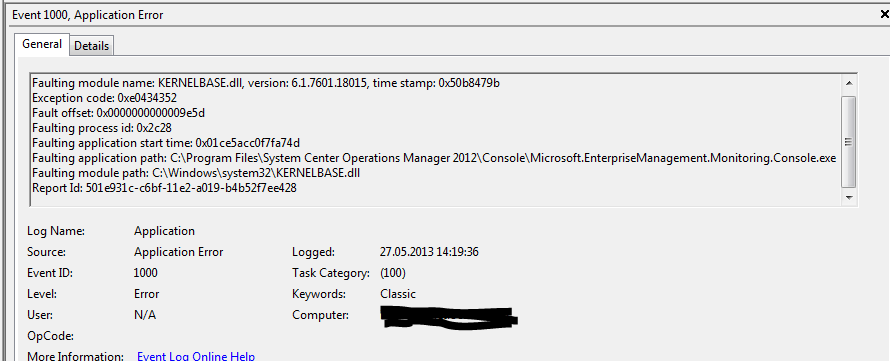
After installing SCOM 2012 test environment, I tried to install SCOM console to my Windows 7 x64 PC. At first run, the console started to crash and continously crashed till I find the root cause.

I installed the SCOM console MSI package from the DVD following this path : \\scomtest2\c$\Yedek\SCOM2012\Setup\AMD64\Console

But obviously it was a mistake :) I forgot to install Report viewer redistrutable package before the console MSI package and the system gave me this error.


Friday, May 24, 2013

Mounting an ISO file via vSphere client displays the error message : "Please specify a valid image file."


I never saw this. I was trying to mount an ISO file located at my Windows 7 PC to a virtual host via vSphere client. It's contuniously displaying the same error message.

"Please specify a valid image file.  ".

It's very funny and simple to solve it. I never experienced that.

http://kb.vmware.com/selfservice/microsites/search.do?language=en_US&cmd=displayKC&externalId=1004611

All you have to do is to change the .ISO extension to lovercases.


Wednesday, March 20, 2013